Here’s your complete guide to writing Barn Finds articles in a short video! So start with it and then read more below if you have questions. And, if you still aren’t sure about something, feel free to email us!
The Format
The first paragraph should still include all the basics – what, where, why, and how much. After writing that, it can be helpful to drop all the photos in and then add commentary under each. I normally research a little before starting this process so that it can just flow out in my own words. Facts, observations, suggestions, and personal experiences can all be used. Please take a look at this post for an example of formatting: https://barnfinds.com/rent-a-wreck-1966-shelby-gt350-h/
Notice how the link, location, and credit are formatted. We don’t want to stifle anyone’s creative freedom here, but if we all follow the same basic layout, it will be easier for Josh to edit and easier for our readers to read. If you use photos from other sites, be sure to link the image back to the source. Don’t copy text from other sites and always give credit where it is due.
Be Picky
We try to keep the assignments list full so that you can spend your time writing, rather than hunting. When we get behind, the list will automatically give you access to all the reader tips. Not all of them are worth featuring though, so be selective. We have one simple method for picking something to write and that’s to ask yourself, “would I want to read about this car?”.
Picking A Title
It might not seem like a big deal, but a well-written title can turn any post into a viral success! The title is often the first thing readers see and while the photo might grab their attention at first, the title generates the interest that makes them want to read on. We want to see titles to follow a basic structure for uniformity sake, so try to structure them with a short and creative intro followed by the year, make and model. Also, be sure to capitalize the first letter of each word. Sometimes you will need to diverge from this format and that’s alright if it’s necessary, such as with a large collection or a story, but whenever possible stick with the basic structure. There’s no formula for writing catchy titles, but short ones with a bit of mystery always do well!
Keep On Truckin’
Everyone is good at encouraging conversation, so let’s keep that up. We have received many compliments from our readers about the variety of cars and stories so I think we are doing a lot of things right! Josh and I couldn’t do it without you guys and we really appreciate everyone’s hard work. Writing on a blog day in and day out can get daunting. We don’t want anyone to feel burnt-out or bored so if anyone needs to take a little break, please let me know. Disconnecting for a day or two can really clear your head and help you feel refreshed. Also, be sure to let us know if there is anything we can do to make this experience better for you. Again, I am grateful for you guys and have a good feeling about the future of the site!
Creating Posts
So here’s the video on how to create a post in WordPress! It also covers how to upload photos, crop them, and set the default image size.
As you can see, it’s pretty simple to use! I went through it pretty fast, so if you have any questions please ask. I will be finishing the written guide in the next couple days and will be adding it to this post. Hopefully, this gets you started and covered all the crucial aspects of creating a post!
Inserting the More Tag
At the end of the first paragraph of each post, we need to insert the More Tag. It’s a simple piece of code that tells the site where the end of the first paragraph is and where the second one begins. Having this code in there allows us to generate excerpts for use in the daily emails, so it can help or hurt a post’s performance depending on whether you get it in there right or not. To help you get it right, here’s a quick photo guide to inserting it!
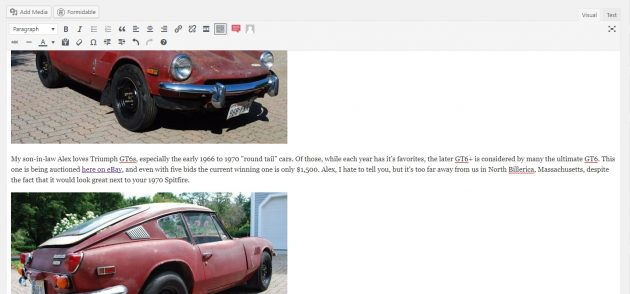
Here’s how your post will look before inserting the tag.
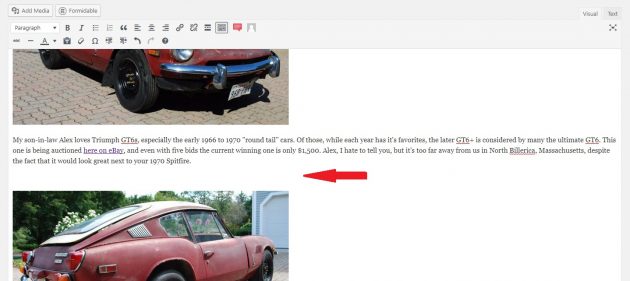
To get the spacing correct, you need to add a return between the end of the first paragraph and the second photo. Without this space, it can mess up the photos.
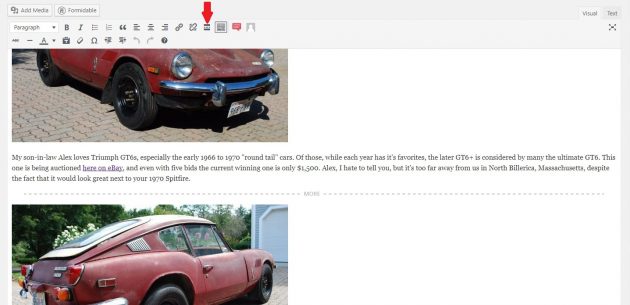
Now that you have your space, click on the empty space and click the More Tag button. There’s a red arrow pointing to the button in the photo above!
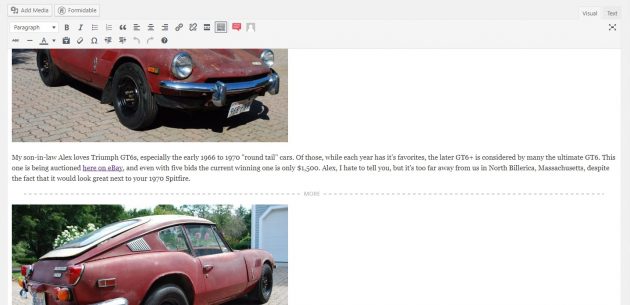
This is how your post should look now that you’ve added the more tag. If the gaps between your text and photos don’t match up with this, you’ve got something wrong.
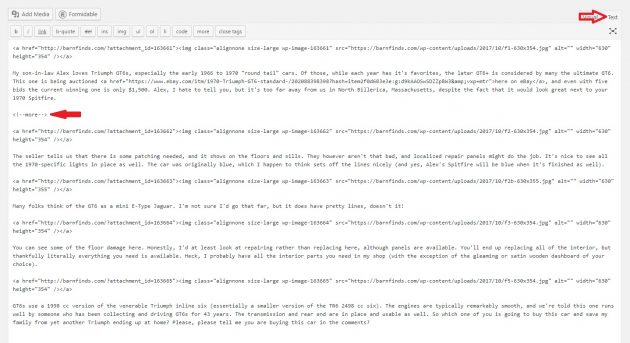
Here’s a shot of the code version of the post, to see it click Text up in the right-hand corner (to go back click Visual). Then make sure there is the same amount of space above and below the <!–more–> text. If your post’s code looks like this, you are good to go!
Guide To Inserting Image Galleries
Here’s a video on inserting image galleries into your posts!
Post Tags
Ok guys, here are the approved tags to use when tagging your posts! Remember tags play a critical role in how the site connects the related posts together and also help readers find cars they are looking for.
Origin Tags – If you find something that isn’t from one of the countries in the list, just add it!
American, British, French, German, Japanese, Italian, Swedish, etc.
Manufacture Tags – We want to keep these uniform, but if you feature something we’ve never featured before just add it!
Be sure to use the brand’s full names, unless they are super long, like Mercedes-Benz (just shorten it to Mercedes). I won’t list these tags, as they are pretty self-explanatory.
Category Tags – We need to try to limit these and make sure they are uniform. Too many and it gets complicated to navigate the site, plus no one wants to go to a page with just one car in it.
Projects, Survivors, Drivers, Oddballs, Muscle Cars, Hot Rods, Race Cars, Motorcycles, Trucks, Wagons
When in doubt, just start typing the tag in and a drop-down should appear with the existing tag. And if all else fails, publish it and I will change it to the correct tag or format!
Facebook Excerpt
Facebook has become a great source of the traffic to the site. A well-written excerpt (the text that gets posted to our wall) can make a post a viral success, who doesn’t want to have their post seen by tens of thousands of readers?
So how do you write a catchy excerpt? Well, first you need to figure out where to write your text. Thankfully that’s the easy part! Below the area where you write your post is a field labeled “NextScripts: Social Networks Auto Poster – Post Options”. Inside that field should be a message box for your Facebook text. Here is a screenshot of the box you are looking for:
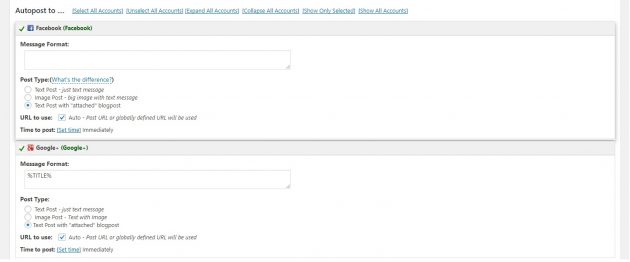
Below where it says Facebook (Facebook) is the area to enter your catchy attention-grabbing text!
Now for the hard part. Your excerpt needs to be short, yet interesting and includes some type of call to action. Posts that ask questions, challenge viewers to share stories or invite them to read more tend to do the best, so keep that in mind.
Assignment List!
We’ve now set up the assignments list. You can find the list on the right-hand side of the site when you are on the homepage. Feel free to claim any of the finds that are available, just make sure when you claim it that you are able to write up within a reasonable time frame and that you give whoever submitted it credit (in parenthesis next to the title). We try to make sure we haven’t already featured what’s in the list or that someone hasn’t already started writing the find up, but sometimes things happen, so try to make sure someone else isn’t already writing it from the All Posts page. Also, make sure to click done when you’ve finished writing it up! And if you see one in the unclaimed list that has already sold, feel free to hit delete so we can keep the list up to date.
Site-wide Consistency
As we’ve stated before, we don’t like to stifle creativity, but we also want to make sure there is a consistent experience across the entire site. To do that, we need to set some guidelines on certain things. This list may change and evolve over time, so check back once in a while. And if there is something you feel that everyone needs to be doing consistently, let us know and we can add it to the list. So what things need to be consistent between posts?
The Format – Each post should start with a photo, followed by a first paragraph that includes the link (if it’s for sale), the location and the asking price (or current bid). Each section after that should follow the same format of an image followed by a signal paragraph. If you feel there is more to say, add another photo. If there isn’t another photo in the seller’s ad, old ads are always interesting (just make sure to cite where the image came from!)
Links – When linking to craigslist and eBay, let’s try to keep things similar across posts. We’ve found here on craigslist or here on eBay to be the most effective way of making sure readers know how to access the ad. Also, make sure eBay is always presented with a lower case e and upper case B.
Abbreviations – For the most part, there’s flexibility here, but commonly used ones should be consistent across the site. Examples are mph, AC and BIN. If there are any others, you feel should be here, let us know with your reasoning why!
Image – Again, this is one that there is some flexibility. Not every seller will include quality photos but we want to always use the best photo first. Best is subjective, but this site is called Barn Finds, so if there’s a photo of it in the barn there’s a good chance that’s the best photo. Also, if the photo has lots of empty space(ground or sky) at the top and bottom, let’s crop it out. We prefer photos be cropped to a ratio of 16:10 to 16:9, but 4:3 or 3:2 are both perfectly acceptable if going to 16:10 cuts any of the cars off.